TSH-06F IC Tester · Volume 1
TSH-06F IC Tester — Vol 1: What It Is and How to Drive It
A pocket logic-chip tester sold under a dozen names: the hardware, the menus, and the keys.
1.1 One tester, many names
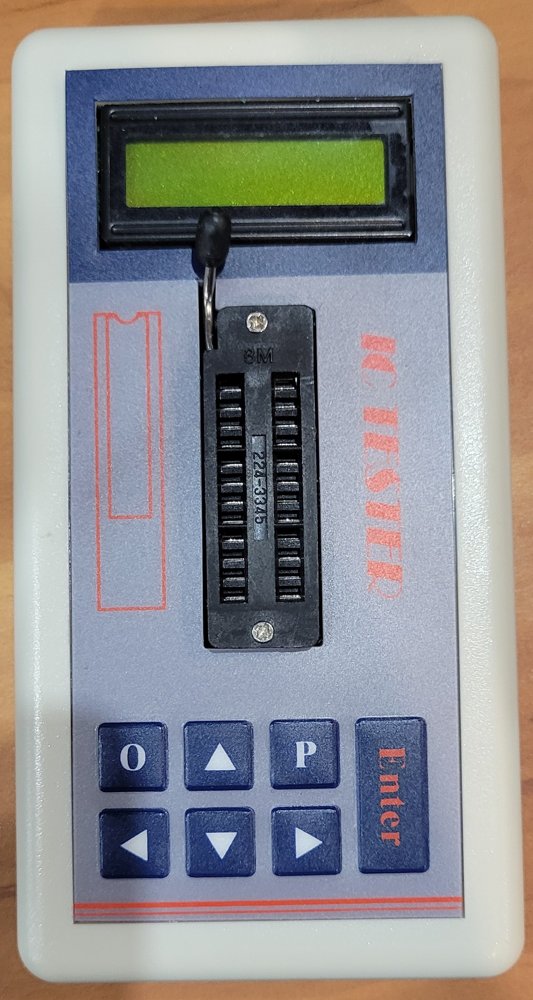
I have had this tester for a long time. It carries no maker’s name, only “IC TESTER” in red on the panel. It turns out to be one of the most widely sold pieces of hobby test gear around. The same white case, blue-and-grey panel, yellow-green character LCD and eight-key pad are sold today as the TSH-06F. On 8 November 2026, one AliExpress listing called it the “TSH06F IC Analyzer” for US $45.19 and named the brand as FNIRSI in its specifications (AliExpress listing 3256812954709822, read 2026-11-08). On Amazon, the same unit is sold under Fdit, LiebeWH, Walfront, Telituny and Akozon (Amazon B086VMFDS5; manuals.plus, LiebeWH; manuals.plus, Walfront).
None of those names is the manufacturer. They are resellers’ labels on a generic design. The model number, TSH-06F, is the only constant.
I checked my unit against the listing photos key by key, and it matches. Its menu also includes the TR (transistor) and ZD (Zener) entries. Those mark the full TSH-06F menu, not a cut-down earlier model.
1.2 The hardware at a glance
Table 1 — The hardware at a glance
| Item | What it is |
|---|---|
| Display | 16-character × 2-line LCD, yellow-green backlight (switchable) |
| Socket | 3M Textool ZIF, 24 positions; mine is marked 224-3345 |
| Keys | O (quick off), ▲ ▼ (change menu or digit), ◀ ▶ (move the cursor), P (backlight), Enter (power on, run the test) |
| Power | 2 × AA cells; the battery voltage is shown at power-on; auto-off after 60 s idle |
| Test supply | 5.0 V or 3.3 V, chosen in the Search menu, or AUTO |
| Interface | None. No USB, no serial port, no update path |
Source for the keys, power and menus: the two-page English operating instructions (TSH-06F Operating Instructions, supereyes.ru copy (Library copy)).
1.3 Turning it on and off
- On: hold Enter for more than 2 seconds. The battery voltage appears first.
- Off: press O; or press Enter while in the OFF menu; or hold Enter for more than 10 seconds anywhere; or leave it alone for 60 seconds.
- Low battery: the manual warns that low voltage “will affect the reliability of the test results”, and the tester shuts itself down to protect against that. Fresh cells are the first thing to try when good chips start failing.
1.4 The menus
▲ and ▼ step through the menus. ◀ and ▶ move the cursor through a part number so that each digit can be set with ▲ ▼. Enter runs the test.
Table 2 — The menus
| Menu | What it does | You enter |
|---|---|---|
| Search (AUTO / 5.0 V / 3.3 V) | Identifies an unknown chip in the socket and reports whether it is good | Nothing |
| 74HC | 74HC-series logic. Same library as 74LS, “different driver circuit” | The part number |
| 74LS | 74LS-series logic. Same library as 74HC | The part number |
| CD40 | CD4000-series CMOS | The part number |
| HEF40 | HEF4000-series CMOS (listed as different from CD40, same drive) | The part number |
| 45/145 | 4500 and 14500-series CMOS | The part number |
| OTHER | Interface chips: MAX232, MAX485, 75175, 75176 and similar | The part number |
| AMP | Op-amps and comparators: LM324, LM358, LM339, LM393, LM2902 | The part number |
| TR | Identifies a transistor’s type and pinout: NPN, PNP, N-MOS, P-MOS, one- and two-way SCRs, diodes | Nothing |
| ZD | Measures a Zener diode’s voltage, 0–5 V, 0.01 V resolution | Nothing |
| LIGHT | Optocouplers: TLP521-1, PC817, PC923, 4N25, HCNW4506, BRT11/12/13, HCPL-3101 | The part number |
| OFF | Switch off | — |
Sellers claim a built-in library of “over 1,300” chip types, all of 24 pins or fewer (Besomi TSH-06F listing). No manual I have read prints the full list, and that matters. The only way to know whether a part is in the library is to enter its number and see what the tester says.
1.5 Where things go in the socket
The manual’s placement rules:
- Chips sit at the bottom of the socket, the end away from the lever, with pin 1 at the notch end as the panel outline shows. A 14-pin chip therefore leaves the top five rows of the socket empty.
- Transistors go into socket pins 10, 11 and 12, the three bottom-left positions. The display reports the pinout in that left-to-right order.
- Zener diodes go between socket pins 13 and 14.
- Optocouplers: the manual names socket pin 13 for the saturation-voltage reading.
1.6 Firmware
No firmware update exists that I could find. There is no port on the outside, and no seller or manufacturer publishes an image or an updater (searched 8 November 2026). Inside, there is an unpopulated header that is probably the factory programming connection for its STC microcontroller (Vol 2), but there is nothing published to load through it. What a unit can test is what it shipped with. Vol 4 covers testers that can be updated, and one whose test library anyone can edit.
1.7 What comes next
Vol 2 explains how the test works and what it cannot see. Vol 3 is the practical part: checking the 7400-series chips for my KENBAK-1 reproduction. Vol 4 looks at testers that go further, including ones that can test the 2112 RAMs in a Heathkit ET-3400.
Comments (0)